
Imagine logging into your WordPress site one morning and finding everything looks normal.
- Your pages load.
- Your content is intact.
- Visitors aren’t reporting any issues.
So your site must be fine, right?
Not always.
One of the biggest misconceptions among WordPress site owners is that a hacked website always shows obvious symptoms.
However, in reality, many attacks are designed to stay hidden. A compromised site may continue working normally while hackers inject spam pages, create hidden admin accounts, steal resources or plant malicious code for later use.
Even the industry data shows that up to 46.7% of hacked WordPress sites had injected SEO Spam of which they were completely unaware till they checked their search engine visibility. Plus, even 69.6% of compromises install unauthorized backdoors, allowing hackers quiet and persistent access without changing the public facing designs.
If you’ve found yourself wondering, “Has my WordPress site been hacked?” or “Could my website be compromised without me knowing?”, this guide will help you identify the warning signs of WordPress website hack and take action before a small issue becomes a big problem.
Can a WordPress Site Be Hacked Without Obvious Symptoms?
Yes, a WordPress site can absolutely be hacked without obvious symptoms.
These days, many hackers actively use “Stealth Malware” designed to look and work perfectly for WordPress site owners while secretly exploiting your server in the background. They can run malicious redirects, bulk spam or SEO injections without you ever knowing ….until it’s too late.
In fact, some of the most successful WordPress attacks are designed to avoid detection for as long as possible – just like the incident of “The VerxTrio DollyWay Campaign”. Uncovered by cybersecurity researchers, a massive cybercrime network known as VexTrio used a stealth campaign that compromised over 20,000 WordPress websites.
The reason it managed to stay hidden this long is because they used conditional logic. If a site admin logged into the backend, the website worked normally. But, if a normal visitor arrived via a search engine, the malware secretly used traffic distribution systems (TDS) to redirect them to scam pages and malware downloads.
On the flip side, some hackers may also:
- Create a hidden administrator account
- Inject SEO spam pages into your website
- Add malicious scripts to theme or plugin files
- Send spam emails from your hosting account
- Use your server resources for unauthorized activities
- Install backdoors that allow future access
The tricky part of these kinds of attacks is that none of these activities necessarily change how your website looks to visitors either.
- Your homepage may still load normally.
- Your content may still be accessible.
- Your forms and navigation may continue working as expected.
That’s why many WordPress website owners assume everything is fine until they discover a security warning, notice strange search results or receive an alert from their hosting provider.
Before assuming your site is secure, ask yourself:
| Quick Security Check | Why It Matters |
| Do you recognize every administrator account on your website? | Unknown users = unauthorized access. |
| Are all plugins and themes from trusted sources? | Vulnerable or compromised software is a common attack vector. |
| Have you checked Google search results for your website recently? | SEO spam mostly appears in search results before it’s noticed elsewhere. |
| Are WordPress core, plugins and themes fully updated? | Outdated software remains one of the leading causes of website compromises. |
| Have you received any security alerts from your hosting provider? | Hosting companies often detect suspicious activity before site owners do. |
The good news? Most hacked WordPress websites leave clues behind. The key is knowing which warning signs deserve your attention.
6 Warning Signs Your WordPress Site May Be Hacked
Not every hacked WordPress site shows obvious signs.
Some warning signs are easy to spot, while others need a closer look.
Thus here’s a quick overview of the most common indicators of a WordPress website hacked:
| Warning Sign | Risk Level | What It Could Mean |
| Unexpected redirects. | High | Malware or malicious scripts redirecting visitors. |
| Unknown admin users. | Critical | Unauthorized access to your website. |
| Strange pages in Google. | High | SEO spam or hidden content injections. |
| Hosting security alerts. | Critical | Malware, spam activity or suspicious file changes. |
| Unfamiliar plugins or theme changes. | High | Backdoors or unauthorized modifications. |
| Slow or unstable website performance. | Medium – High | Resource abuse, malware, or server compromise. |
Let’s take a closer look at each of these warning signs of a WordPress site hacked.
1. You Notice Unexpected Redirects

Whenever you notice any kind of unexpected redirect. That’s a clear red flag.
It means your WordPress site is hacked due to injection of malware or backdoor attacks which are designed to manipulate search traffic, steal visitor data and earn affiliate commissions for bad actors.
You might click a page on your website and suddenly land on:
- Gambling websites
- Fake online stores
- Cryptocurrency promotions
- Suspicious download pages
In some cases, the redirects only affect mobile users or visitors arriving from search engines which makes them harder to detect during routine checks.
Thus you must ask yourself:
Have you ever clicked your own website from Google and landed somewhere unexpected?
If the answer is yes, investigate immediately. Redirect malware is used to exploit your site’s traffic while remaining hidden from administrators.
2. Unknown Admin Users Appear in Your Dashboard
When I suspect a WordPress is hacked, one of the first places I check is the user list.
Inside your WordPress admin dashboard, go to the Users → All Users.

If you discover administrator accounts you didn’t create, high chances are your WordPress site hacked or may have been compromised.
Thus some common red flags are:
- Unfamiliar usernames
- Administrator accounts linked to unknown email addresses
- Recently created users you don’t recognize
- Existing accounts with elevated privileges
Attackers mostly create backup administrator accounts so they can regain access even if one account is removed. Thus if you find a user you don’t recognize, don’t ignore it.
3. Strange Pages Start Appearing in Google
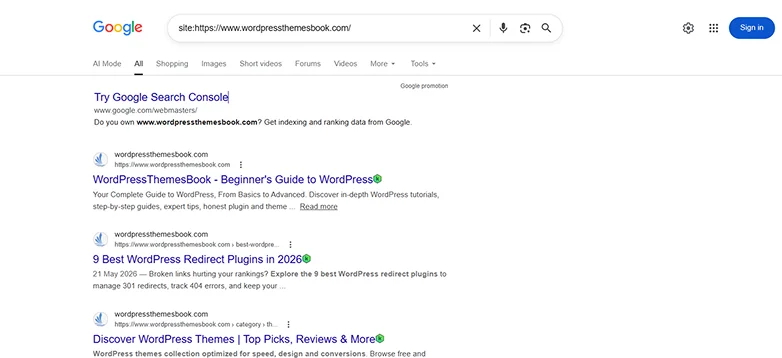
Many WordPress attacks are focused on SEO spam rather than visibly damaging your website.
Thus hackers who hack WordPress sites mostly creates hundreds of hidden pages targeting:
- Casino keywords
- Counterfeit products
- Pharmaceutical terms
- Adult content
- Cryptocurrency scams
The easiest way to check is by searching:
site:yourdomain.com
Review the indexed pages carefully. And if you find pages, posts or URLs you never created, it means that the malicious content has been injected into your website. Most of the time, this type of attack goes unnoticed because visitors never see the spam pages directly.
4. Your Hosting Provider Sends Security Alerts
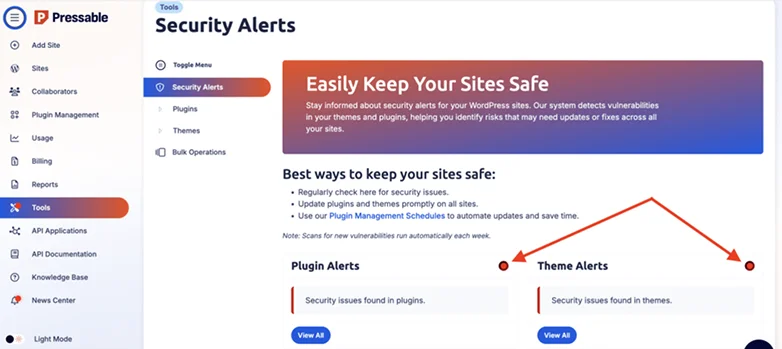
Sometimes the first sign of a WordPress website being hacked doesn’t come from WordPress itself. It comes from your hosting company.
Hosting providers (if you have the right one) always monitor their servers for suspicious activity and notifies you about:
- Malware detection
- Excessive resource usage
- Spam email activity
- Suspicious file modifications
- Blacklisting warnings
This is one of the reasons choosing the right WordPress hosting provider matters.
Back to the topic, many website owners dismiss these alerts because their site still appears to be working normally.
That’s a big (and expensive) mistake!
WordPress Hosting providers detect security issues before website owners notice any visible symptoms. Thus if your host also sends a warning, take it seriously, never ignore and investigate right away.
5. Unfamiliar Plugins or Theme Changes Appear
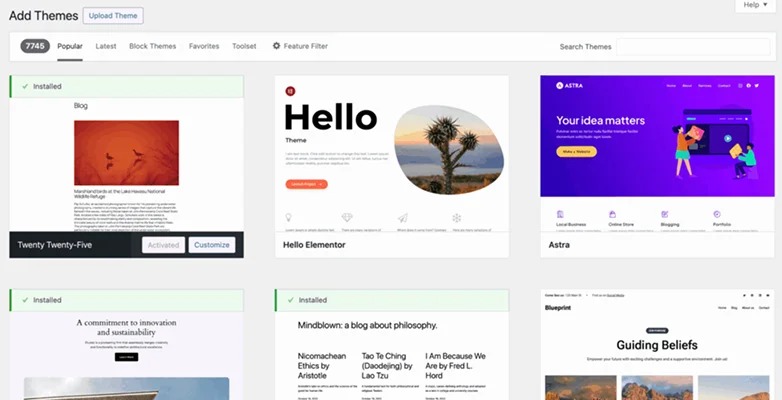
Now before we go dig deeper into this, allow me to ask you a very simple question:
Do you recognize every plugin and theme installed on your website?
If the answer is no, that’s worth investigating because WordPress hackers sometimes install:
- Backdoor plugins
- Malware loaders
- Fake security plugins
- Modified themes containing malicious code
Thus you must review your installed plugins, active theme, recently updated files, and theme and plugin settings. Any unexpected changes, especially ones you didn’t make, could show unauthorized access.
The longer these changes remain unnoticed, the more time attackers have to control your website and destroy it completely.
6. Your Site Suddenly Becomes Slow or Unstable

Performance problems don’t automatically mean your WordPress site has been hacked. But, they can be an important warning sign.
If your WordPress is hacked, your website is going to show minor (Yet important) signs such as:
- Slow page loading times
- Frequent downtime
- Increased CPU or memory usage
- Unexpected hosting resource spikes
- Database errors
This happens because malicious scripts are running in the background and consume your server resources without your knowledge. Thus if your WordPress website suddenly becomes slower and you can’t understand a clear cause such as increased traffic, a new plugin, or a hosting issue, security should be part of your investigation.
A noticeable performance decline is mostly one of the first technical clues that something isn’t right behind the scenes
What To Check First When I Think My WordPress Site Has Been Hacked

Whenever I suspect a WordPress website hack, I don’t immediately assume the worst, nor should you.
In scenarios where our team suspects a WordPress website hacked, we start with a few quick checks that can reveal whether there’s a genuine security issue or just a temporary technical problem.
The goal is simple: look for the most common signs of compromise before spending hours troubleshooting.
Here’s the checklist I follow first:
| Quick Check | What I’m Looking For |
| Administrator Accounts. | Unknown users or accounts with elevated privileges. |
| Installed Plugins & Themes. | Suspicious additions or unauthorized changes. |
| Google Search Results. | Spam pages or strange indexed URLs. |
| Security Scan Results. | Malware, backdoors, or infected files. |
| Recent File Changes. | Unexpected modifications to core files, themes or plugins. |
| Update Status | Outdated WordPress core, plugins, or themes. |
These checks won’t uncover every possible threat, but they can still quickly reveal just how many signs you have of a hacked WordPress website and let you conduct a deeper investigation.
My WordPress Site Has Been Hacked: What Should I Do?

Don’t panic, nor wait for the worst!
Start by changing all passwords associated with your website. This includes WordPress administrator accounts, your hosting account, FTP or SFTP credentials, database access and any email accounts connected to your website. If an attacker has got any access via these hacked credentials, then updating them right away is the safest option to prevent more damage than done.
Later, make sure to review all user accounts on your website. If you see any users or accounts you don’t remember creating, delete them – instantly!
Now scan your website for malware and suspicious files. A complete security scan is the best to know the extent of the compromise and areas that need attention right now.
Updating WordPress core, plugins and themes should be another priority. Outdated software remains one of the most common causes of WordPress website hacks.
If you keep regular backups, consider restoring a clean version of your website from a point before the site got hacked. And finally, at last, keep a close eye on your website afterwards.
Track for all or any unusual activity, unexpected file changes, new administrator accounts or recurring redirects. Some attackers leave hidden access points behind specifically to regain control after a site has been restored.
The good news is that most WordPress hacks can be resolved successfully. The faster you respond and the more thorough your cleanup process is, the better your chances of minimizing downtime, protecting your visitors, and preserving your search rankings.
Your Next Steps for a Safer WordPress Site
For keeping your WordPress website safe and sound, you must first recognize the telltale signs that may help you figure out if your WordPress is hacked or compromised.
Some of the common yet important warning sights of having your WordPress website hacked are:
- You notice unexpected redirects
- Unknown admin user appear in your dashboard
- Strange pages start appearing in google after searching your website
- Your hosting provider is sending security alerts
- Unfamiliar plugins and theme changes appears
- Your WordPress site suddenly becomes slow or unstable
If you noticed any of these signs, your next step should be fixing those vulnerabilities. Then, build robust WordPress security strategies to secure your login process, keep everything updated and scan your complete WordPress site using WordPress security plugins.
Related Articles:
- 10 Best Multipurpose WordPress Themes in 2026 for Any Business
- How To Use WordPress When You’re Not Tech Savvy (Beginner’s Guide)
- 5 Best WordPress eCommerce Plugins in 2026 (Tested & Ranked)
FAQ
Is WordPress safe from hackers?
Yes, but it needs active maintenance. The WordPress core software is highly secure. But because it powers millions of websites, it is also the most targeted for automated hacker bots.
Why do WordPress sites get hacked?
WordPress sites get hacked because of outdated software, nulled themes, installed plugins by random developers, and weak login password.
Why is someone trying to hack my website?
Hackers target your WordPress websites to exploit them for profit. They don’t have anything personal with you. In fact, most of all hacker attacks are automated with bots scanning the internet for outdated software, weak passwords and known security flaws.
How do you know if your WordPress site has been hacked?
These are the commons signs that lets you know if your WordPress site has been hacked:
- You notice unexpected redirects.
- Unknown admin users appear in your dashboard.
- Strange pages start appearing in google after searching your website.
- Your hosting provider is sending security alerts.
- Unfamiliar plugins and theme changes appear.
- Your WordPress site suddenly becomes slow or unstable.