
- 1 What Is Table Rate Shipping in WooCommerce?
- 2 Why Do You Need a Table Rate Shipping Plugin?
- 3 Best WooCommerce Table Rate Shipping Plugins Compared
- 4 Which WooCommerce Table Rate Shipping Plugin Should You Choose?
- 5 How to Choose the Right Table Rate Shipping Plugin
- 6 Final Verdict
- 7 Frequently Asked Questions
WooCommerce gives you basic shipping methods such as Flat Rate, Free Shipping, and Local Pickup. But these options can become limiting when shipping costs vary according to product weight, order value, quantity, shipping class, product category, or delivery location.
That is where WooCommerce table rate shipping plugins come in.
A table rate shipping plugin lets you create rules that automatically calculate shipping costs based on the conditions of a customer’s cart and destination. For example, you could charge $8 for orders up to 2 kg, $12 for orders between 2 and 5 kg, and offer free shipping for orders above $100.
Let’s compare them in detail.
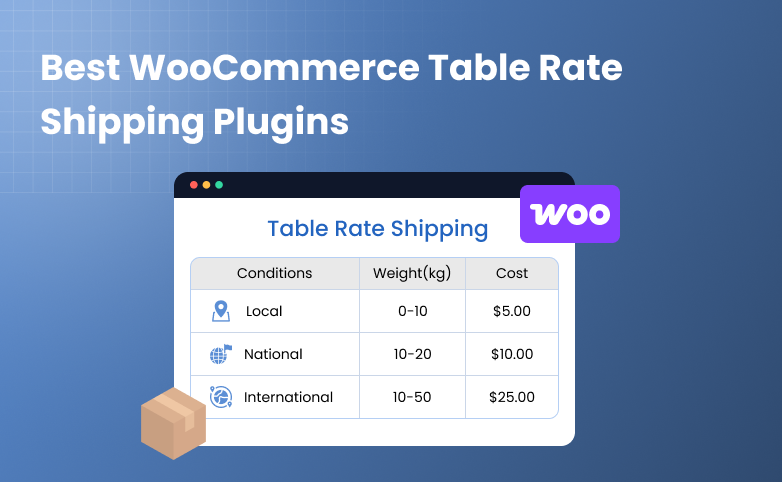
What Is Table Rate Shipping in WooCommerce?
Table rate shipping is a rule-based method of calculating shipping costs in WooCommerce. Instead of charging every customer the same flat shipping fee, you can set different rates based on factors such as order weight, product quantity, cart value, shipping class, product category, or delivery location.
For example, a store could create rules like:
| Order condition | Shipping cost |
| Up to 2 kg | $8 |
| 2–5 kg | $12 |
| 5–10 kg | $18 |
| Orders above $100 | Free |
| Local ZIP codes | $5 |
| Remote locations | $15 |
You can also combine multiple conditions. For example, an order weighing 5–10 kg and shipping to California could be charged $18, while the same order going to another location could have a different rate.
This gives you more control over shipping costs than a standard flat rate and helps you charge rates that better reflect your actual fulfillment costs.
Why Do You Need a Table Rate Shipping Plugin?
A flat shipping rate works well when your fulfillment costs are relatively predictable. But it becomes problematic when your products have different shipping requirements.
For example, imagine a store selling both phone cases and furniture.
Charging a single $10 shipping fee could mean:
- You overcharge customers buying lightweight products.
- You lose money shipping heavy products.
- Customers in distant locations pay the same amount as nearby customers.
- You have limited control over special products.
Table rate shipping lets you create rules that better reflect your actual fulfillment costs.
It can be particularly useful for:
- Stores with products of different weights
- Wholesale and bulk-order stores
- Stores shipping internationally
- Stores with different shipping zones
- Stores using shipping classes
- Stores with heavy or oversized products
- Stores offering free shipping above a threshold
- Stores that need different rates for different ZIP codes
Best WooCommerce Table Rate Shipping Plugins Compared
| Plugin | Best For | Main Conditions | Starting Price* |
| Table Rate Shipping by WooCommerce | Official WooCommerce solution | Weight, price, item count, shipping class, location | $119/year |
| PH Table Rate Shipping Pro for WooCommerce | Advanced, flexible shipping rules | Weight, price, quantity, category, class, country, state, city, ZIP | $79/year |
| Flexible Shipping PRO | Advanced conditional shipping | Weight, price, quantity, dimensions, classes, roles, time-based rules | Starts from $99/year |
1. Table Rate Shipping by WooCommerce
Best for: Store owners who want an official WooCommerce table rate extension.
WooCommerce’s official Table Rate Shipping extension expands the platform’s standard shipping functionality by allowing merchants to define multiple rates based on location, price, weight, shipping class, and item count.
You can create multiple rate tables for shipping zones and choose how to calculate shipping.
Supported calculation methods include:
- Per order
- Per item
- Per line
- Per shipping class
You can also add costs based on:
- Row
- Item
- Percentage
- Weight unit
This makes the extension suitable for stores with relatively structured shipping rules.
For example, you could charge different rates according to weight:
- 0–1 kg → $5
- 1–3 kg → $8
- 3–5 kg → $12
Or create rates based on the number of items or product shipping classes.
The official WooCommerce documentation also provides examples for setting up shipping zones, shipping classes, weight rules, item-count rules, price conditions, minimum and maximum costs, and handling fees.
Pricing:
WooCommerce currently lists the extension at $119/year, with a 30-day money-back guarantee, and holds a 3.5/5 rating from 19 reviews on WooCommerce.com.
Who should choose it?
This option makes sense if:
- You prefer official WooCommerce extensions.
- Your shipping requirements are relatively straightforward.
- You mainly need weight, price, item-count, and shipping-class rules.
- You want to stay within the WooCommerce extension ecosystem.
Verdict: A solid official option for standard table rate shipping, although stores needing more granular product and destination rules may find PH Table Rate Shipping Pro more flexible.
2. PH Table Rate Shipping Pro for WooCommerce

Best for: WooCommerce stores that need granular control over shipping rates and locations.
PH Table Rate Shipping Pro for WooCommerce is our top recommendation because it combines the core table rate conditions most WooCommerce stores need with detailed destination-based rules and easier management of large rule sets.
You can create unlimited rules based on:
- Product or order weight
- Product quantity
- Total cart price
- Product categories
- WooCommerce shipping classes
- Shipping zones
- Destination country
- State and city
- ZIP/postal codes
The plugin also supports bulk CSV import and export, which can be especially useful when you have a large number of shipping rules to maintain.
Example: Weight-based shipping
Suppose you sell packaged food products:
| Order weight | Shipping rate |
| 0–2 kg | $7 |
| 2–5 kg | $10 |
| 5–10 kg | $15 |
| 10–20 kg | $22 |
PH Table Rate Shipping Pro can automatically apply the appropriate rate according to the cart weight.
Example: Location-based shipping
You could create different rules such as:
- California → $8
- Texas → $10
- New York → $12
- Remote ZIP codes → $18
You can also combine location with weight, quantity, price, or other supported conditions.
Other useful capabilities
PH Table Rate Shipping Pro also supports:
- Per-product shipping rates via a free add-on, so individual products can carry their own shipping cost
- Bundled rate shipping via a free add-on, useful for combining multiple products into one calculated rate
- Additional handling fees and shipping discounts layered on top of calculated rates
- WPML compatibility for multilingual stores
The plugin holds a 4.98/5 rating from 127 reviews and is priced at $79/year for a single site, with one year of updates and support plus a 30-day money-back guarantee. It’s trusted by 7,000+ WooCommerce stores
Who should choose PH Table Rate Shipping Pro?
Choose it if your store:
- Ships to different rates by country, state, city, or ZIP code
- Needs to combine several conditions in one rule (e.g., weight + destination + category)
- Manages a large or growing number of shipping rules and wants CSV bulk editing
- Wants one plugin to cover both simple and complex shipping setups as the store scales
Verdict: Best overall WooCommerce table rate shipping plugin for stores that want flexibility without unnecessarily complicating their shipping setup.
3. Flexible Shipping PRO by Octolize
Best for: Stores with a few niche shipping scenarios not covered by standard weight-, price-, or category-based rules.
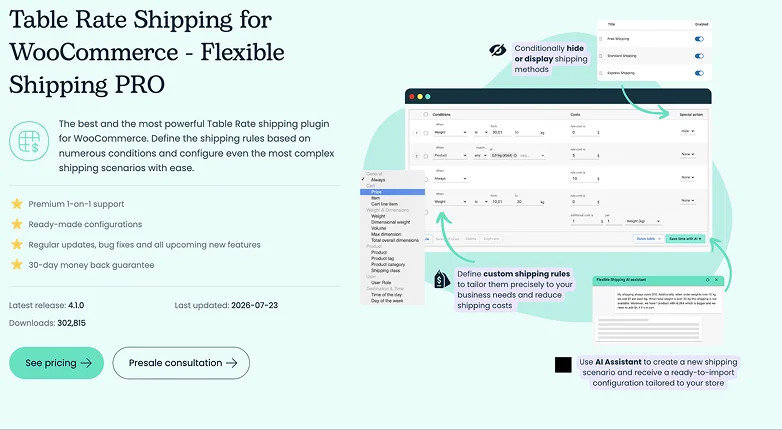
Flexible Shipping PRO is a third-party WooCommerce shipping plugin from Octolize that supports a range of conditional shipping rules, including the standard ones like weight, price, quantity, and shipping class, alongside a small set of additional, more situational conditions.
It can be useful for businesses that need rules such as:
- Wholesale customers get different shipping rates than retail customers.
- Orders containing oversized products require an additional shipping charge.
- Shipping rates change depending on the day or time of the order.
Who should choose it?
Flexible Shipping PRO is worth considering if your store has one of these specific, less common shipping scenarios to handle.
Its add-on ecosystem is modular, so features beyond the core plugin are sold separately, and support is handled over email or via tickets.
Verdict: A useful option for stores with specialized shipping logic, particularly when standard weight, price, and quantity conditions aren’t enough.
Which WooCommerce Table Rate Shipping Plugin Should You Choose?
The right plugin depends on what you are trying to accomplish.
Choose PH Table Rate Shipping Pro if:
You need flexible shipping rules based on products, weight, price, quantity, categories, shipping classes, countries, states, cities, or ZIP codes.
It is particularly suitable for growing stores that want to manage a large number of shipping rules from one place.
Choose WooCommerce Table Rate Shipping if:
You prefer an official WooCommerce extension and primarily need table rates based on weight, price, item count, shipping class, and location.
Choose Flexible Shipping PRO if:
You need more specialized conditional rules, such as customer role, product dimensions, or time-based shipping logic.
How to Choose the Right Table Rate Shipping Plugin
Before installing a plugin, map your shipping requirements.
Ask these five questions:
1. What determines your shipping cost?
Is it weight, price, quantity, destination, product type, or a combination?
2. Do you need location-specific rates?
If shipping costs vary by state, city, or ZIP code, make sure your plugin supports the level of location targeting you need.
3. Do you have many shipping rules?
If you have hundreds of rules, look for CSV import/export or another bulk-management feature.
4. Do you need conditional logic?
For example:
Orders above $100 get free shipping, except for products in the Heavy Items shipping class.
Not every table rate plugin handles complex scenarios in the same way.
5. Will your shipping requirements grow?
Choose a solution that can support your future catalog and shipping strategy instead of selecting a plugin based only on today’s requirements.
Final Verdict
For most WooCommerce stores looking for a powerful and flexible table rate shipping solution, PH Table Rate Shipping Pro is our recommended choice.
Its combination of unlimited rules, weight-, price-, quantity-, category-, shipping-class-, and destination-based calculations makes it suitable for a wide range of WooCommerce shipping scenarios. The ability to manage rates by country, state, city, and ZIP code is particularly valuable for stores with geographically different shipping costs.
WooCommerce’s official Table Rate Shipping extension is a good alternative for merchants who want a straightforward solution within the official WooCommerce ecosystem. Flexible Shipping PRO is better suited to merchants who need specialized conditions and advanced shipping logic.
Ultimately, the best WooCommerce table rate shipping plugin is the one that lets you charge accurate shipping costs without making checkout unnecessarily complicated.
Related Articles:
- 6 Most Popular WordPress Block Plugins in 2026 (Free)
- 17 Most Common WordPress Issues (And How to Fix Them Fast)
- 5 Best WordPress eCommerce Plugins in 2026 (Tested & Ranked)
Frequently Asked Questions
What is the best table rate shipping plugin for WooCommerce?
PH Table Rate Shipping Pro is our top pick for stores that need flexible table rate rules based on weight, price, quantity, product category, shipping class, country, state, city, and ZIP code.
Does WooCommerce have table rate shipping?
WooCommerce does not include advanced table rate shipping as a standard core shipping method. You can add this functionality through an extension such as WooCommerce Table Rate Shipping or a third-party plugin such as PH Table Rate Shipping Pro.
Can I combine weight and location for WooCommerce shipping?
Yes. Combining conditions is one of the main advantages of table rate shipping. For example, you can create one rate for orders under 5 kg shipped to one region and another rate for heavier orders or a different destination.
Can I offer free shipping using table rates?
Yes. You can create rules that make shipping free when an order meets specific conditions, such as exceeding a certain cart value or qualifying for a particular shipping zone.
Is table rate shipping better than flat rate shipping?
If your shipping costs vary by weight, destination, quantity, product type, or order value, table rate shipping provides more control than a single flat rate. Flat rate shipping remains suitable for stores where fulfillment costs are relatively consistent.