
Ever wondered how websites are made? Or why almost 43% of the web runs on WordPress? If you’ve finally heard of it but are left wondering what exactly WordPress is, you’re not alone!
WordPress is everywhere, but if you’re a beginner, it might feel like a maze of plugins, themes and settings yet don’t worry as we are going to answer all your questions in one go-to flow.
In this beginner friendly guide, we’ll explain what WordPress is, how it works and why it’s the go-to platform for blogs, businesses and online stores.
By the end, you’ll know exactly how to get started without getting lost in tech jargon.
What Is WordPress?
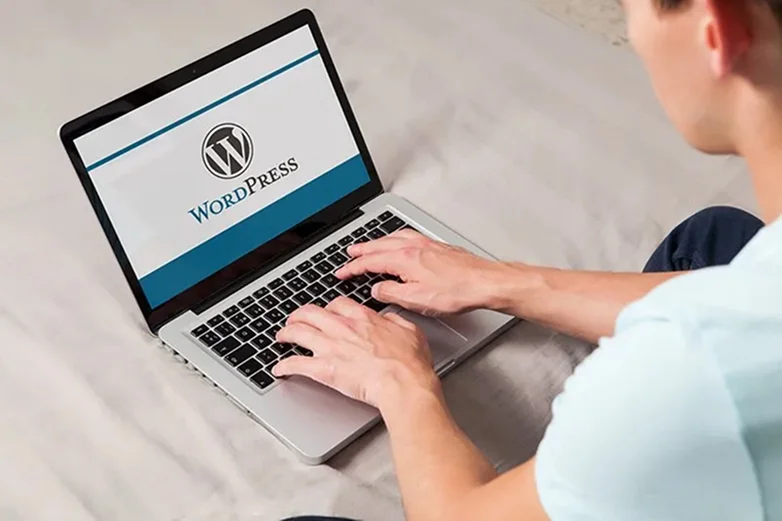
WordPress is a free tool that lets anyone create a complete website with no coding.
Think of it as a website building toolkit. You can write content, add images, videos and even sell your own products with no extra cost or tech savvy coder.
In simple words, WordPress is a digital tool that makes creating and managing websites simple for everyone. Plus, WordPress is also:
- Free and open source so anyone can use it and even improve it
- Fully flexible as you can create any kind of site, from blog, portfolio, membership site, business site and more.
- Easy to manage even for beginners. It lets you create pages, posts, and more with zero coding or tech hassle.
- Powerful with tons of WordPress themes and plugins. These WordPress themes control how your site will look while plugins add extra features.
Here’s a mind blowing fact: More than 43% of websites all over the world use WordPress to run their websites. These include popular platforms such as BBC America, Vogue, The Walt Disney Company, NASA and the list goes on forever.
Thus, WordPress is the most powerful, reliable and simple software for creating, managing and publishing WordPress sites or blog with zero coding,
What Is WordPress Used For?
Back in the days, WordPress was just a blogging tool. But now, it’s grown into a complete website builder for almost every project you can name.
Here’s people commonly use WordPress for:
- Blogs and personal website: You can easily write posts, add images and organize content with categories and tags.
- Business websites: You can create contact forms, landing pages, service-based sites, brand credibility sites and more.
- Online Store: By adding plugins like WooCommerce, WordPress lets you sell physical or digital products and make a full eCommerce site.
- Membership & Subscription sites: Again, by using WordPress plugins such as ARMember, you can paywall exclusive content, create online communities, offer subscription based access and a lot more.
- Portfolio & Resume Websites: If you are a designer or photographer, you can easily showcase your work and make personal brand sites.
- Online Courses: With LMS plugins, you can create online courses, upload videos, track progress and so on.
- Forum, Communities & more: You can even make discussion forums, job boards, event sites, NGO sites, news sites and a LOT more.
What Is WordPress.org vs WordPress.com?
Now before we jump straight into how WordPress works, we are sure you must have come across words like WordPress.org and WordPress.com.
These aren’t just buzz words. While both use WordPress, they work very differently. We can say things like complete opposites.
One of the most common beginner questions are:
“What is WordPress.org?”
“What is WordPress.com?”
“What’s the difference between WordPress.org and WordPress.com?”
So without any further ado, let us give you a picture perfect answer:
What is WordPress.org? (Self Hosted WordPress)
WordPress.org is a self hosted version of WordPress. It is a software you can download and install on your own web hosting.
This is what most people mean when they say,” I use WordPress” or “I work on WordPress”.
With WordPress.org, here’s what you get:
- Complete control over your website.
- Install any theme or plugin.
- Freedom to monetize your site as you want.
- Own all your content.
- Advanced customization options.
- No platform restriction.
However, to use this WordPress.org, you need:
- A domain name (eg: dsdn.com).
- Web hosting (Where your site will actually live).
- Basic setup (Usually simple 1 click install).
- What is WordPress.com? (Hosted Platform).
What is WordPress.com? (Hosted Platform)
WordPress.com is a hosting service that runs the WordPress software for you. It manages everything from hosting, security to updates with ease. However, it is not fully free.
WordPress.org comes with multiple paid plans and a limited free version. Thus, with WordPress.com there are:
- Limited customization (especially on free plans).
- Plugins are restricted unless you upgrade.
- Limited monetization options.
- No full control of the site.
That’s why it’s best suited for personal blogs, hobby sites or simple content publishing.
However, we’ve seen many sites switch from WordPress.com to WordPress.org as their sites grow.
Quick Comparison: WordPress.org vs. WordPress.com
| Feature | WordPress.org | WordPress.com |
| Website Ownership | ✅ Full control | ❌ Limited control |
| Hosting | ❌ You arrange hosting | ✅ Included |
| Customization | ✅ Unlimited | ❌ Limited |
| Plugins & Themes | ✅ Full access | ❌ Restricted (paid plans only) |
| Monetization | ✅ Full freedom | ❌ Limited |
| SEO Control | ✅ Advanced SEO | ⚠️ Basic SEO |
| Best For | Businesses, creators, growth | Personal blogs |
| Cost Flexibility | ✅ You choose | ❌ Fixed pricing tiers |
The key takeaways ?
- Think of WordPress.org as owning your own house. You control everything.
- Think of WordPress.com as renting an apartment. Easy, but limited.
How Does WordPress Work? (Step-by-Step)
If you’re new to WordPress, it might feel like a miracle; you click a few buttons and suddenly a website appears.
However, WordPress actually follows a simple process.
Thus, let’s walk through how WordPress works step by step, from setup to publishing your first page.
Step 1: You Go & Get WordPress (The Engine)
WordPress is a software that will run your complete website. So to use WordPress (especially WordPress.org), you need web hosting. Web hosting is where your site will live.

You can simply:
Go to WordPress.org and download the latest version of WordPress.
Next, install WordPress (the software) on your web hosting. Once installed, WordPress creates:
- Database (to store content)
- Core system files (to run your site)
- and a login dashboard (mywebsite.com/wp-admin)
Once all set, it will become the power engine behind everything you do.
Step 2: You Log Into the Dashboard
After setup, you get full access to the WordPress dashboard. It is like a control center of your site. You decide what you wish to do, give command and a few clicks…and Boom! That’s done.
From here, you can easily:
- Create pages and posts
- Upload media such as images or videos
- Customize your design via Appearance panel
- Install plugins to get extra features
- And a lot more in just a few clicks.
Step 3: Choose a Theme (Design)
A WordPress theme controls how your website looks. From layout, colors, fonts to structure, you can customize everything to make your site match your brand’s vibe.
Simply go to the WordPress dashboard → Appearance. Here you have two options: Whether to get a theme or edit the current one via its own default editor.
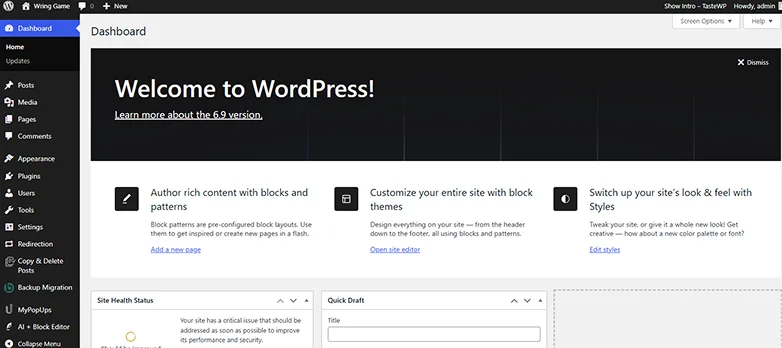
We suggest going with the theme as it’s easier that way.
Head over to “Add Theme” and you’ll see thousands of mind blowing WordPress themes to get started. Later, you can also customize it in your own WordPress default editor.

If you got fond of one, simply hover over it, click on “Install” and then “Activate”.
For now, you can:
- Use a free theme from the WordPress directory
- Install a premium theme for advanced design
- Customize everything using the WordPress Customizer
The best part? Themes don’t change your content. They only change how it’s displayed.
Step 4: Add Content such as Pages & Posts
This is where you start building your site.
You can create:
- Pages → Home, About, Contact, Services, Thank You, Privacy & Policy and so on.
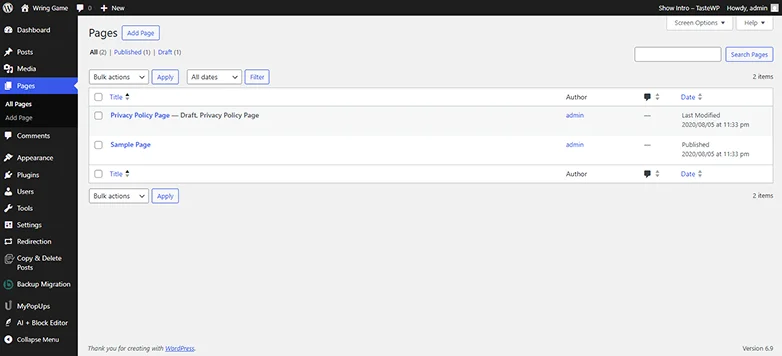
- Posts → Blog articles, News updates, Tutorials and so on.
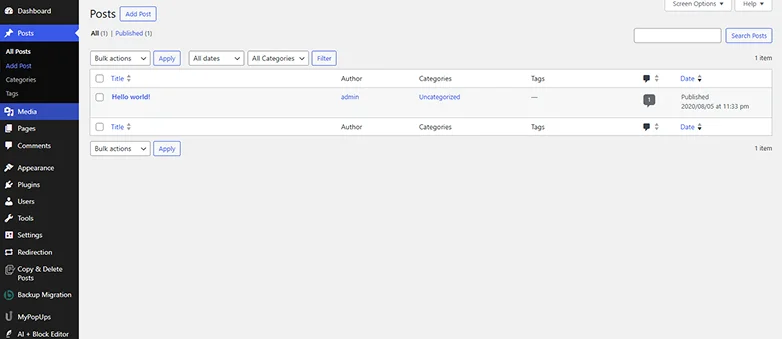
WordPress uses a block editor, so you just simply drag and drop all these for both posts and pages.
- Text
- Images
- Buttons
- videos
- Layouts sections and more.
Step 5: Install Plugins to Add Extra Features
Next, if you are planning to make a business oriented, advanced or complex site, it’s time to add some plugins.
As we discussed earlier, WordPress plugins add extra features in your current setup so you can make powerful and feature rich sites.
Let’s say:
- If you want to make a WordPress site to take online appointment bookings, then you can use BookingPress.
- If you want to create a membership site, online community or online courses, you can use all-in-one membership plugins such as ARMember.
- If you want to improve your site’s SEO, you can try out Yoast SEO or Rank Math.
- If you want to simply make a contact form, order form or subscription form, you can use a form builder plugin like ARForms.
- If you want to create your own affiliate program to boost sales, pick popular affiliate plugins like AffiliatePress.
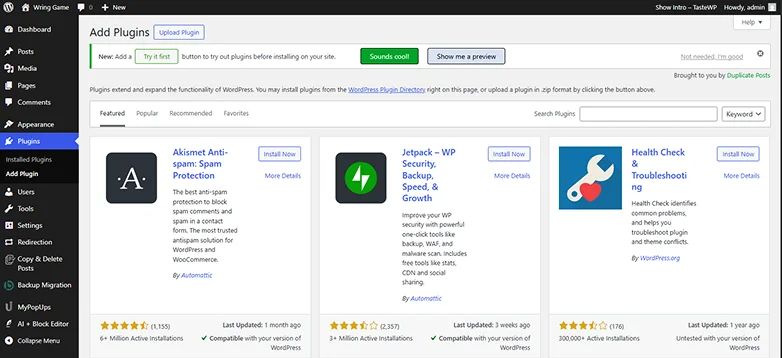
The best part? All these WordPress plugins we mentioned and even beyond that are super easy to install. You can install them all in just a few clicks by:
- First go to your WordPress Dashboard → Plugins → Add Plugins.
- Now you can either search for the plugin you want or Upload the plugin’s zip file which you can get from their official site.
- Next, simply click on “Install”, later “Activate”
- And that’s it!
Step 6: Publish and Manage Your Website
At last, everything is set to go!
Once everything looks good, simply hit the “Publish” button to make your site go live🎉.
Now visitors, random internet surfers or your customers can easily see and interact with your WordPress website using your domain name.
Pros and Cons of WordPress
WordPress is powerful and popular but like any tool, it has both it’s own share of advantages and drawbacks. So before jump to any conclusion, let’s take a look here:
Advantages of WordPress
- Free and open source
- Highly customizable
- User friendly interface; no coding
- Full flexible and easy to grow with
- Tens of thousands of WordPress themes and plugins
- SEO friendly
- Supportive and strong community worldwide
- Fully responsive
Disadvantages of WordPress
- Security risks due to its high popularity; although there are so many WordPress security plugins (May add a little extra cost) for that yet so no worries
- Frequent and regular updates of core WordPress along with its themes and plugins are must
- Heavy themes and plugin can slow down site (Thus, choose lightweight plugins or themes always)
- Expensive if you want more features and customization options (Premium themes and plugins are costly and free version is limited)
- Takes efforts and time to understand advanced features and troubleshooting (Well, that’s what we are here for..so chill 😎)
Final Thoughts: Why Is WordPress So Popular?
In a nutshell, WordPress is a software that allows you to create and manage a complete website with zero coding.
The secret behind its popularity is behind WordPress being easy to use, flexible and most importantly….affortable & budget friendly for a LOT of small to medium size businesses. Plus, even people with zero technical skills can use it and make their own WordPress site with zero hassle.
But that’s just the surface. Here’s why millions of people still choose it:
- Anyone can use it: You don’t have to be a developer or designer to make your dream site.
- Works for almost every website: Whether you want to build a membership site or simple business site, WordPress gives you simple drag and drop editors and ready made designs to go.
- You stay in full control: With WordPress, you own your website and your content completely with no limits.
- Powerful yet flexible: With thousands of WordPress plugins and themes, you can add any feature you can think of in one click. Also, it’s open source so if you can find it, make it or get it from wherever you want.
- Budget Friendly: You can start small and can easily grow your business in no time.
Get started with WordPress right away and make your first Website with zero hassle!
Related Articles